
guide:mobaxterm_keys
Table of Contents
Windows MobaXterm
Use the "Installer" version of MobaXterm
 IMPORTANT
There are two downloadable versions of the MobaXterm home edition - An “installer” version and a “portable” version. Do not use the portable one, it creates home directories that are not persistent. Use the installer version
Disable Remote Monitoring
IMPORTANT
To prevent your account from being blocked for suspicious behavour, disable Remote Monitoring in MobaXterm:
- Go to settings → configuration → SSH (Tab) → uncheck Remote Monitoring (experimental)
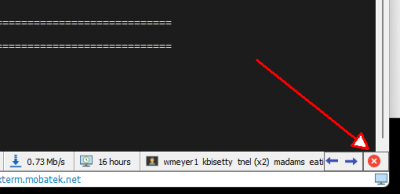
Or, click on the red X at the right end of the status bar:
Generating ssh keys in MobaXterm

- Start a local terminal from the initial page in MobaXterm or click on the “+” sign which is to the right of the tabs.
- Generate a new key:
ssh-keygen -t ed25519 -C "your_username@lengau"
- Press Enter to accept the default file location.
- Please also use a passphrase for security.
- Keep the private key safe in:
/home/mobaxterm/.ssh/id_ed25519
- Show your public key:
cat $HOME/.ssh/id_ed25519.pub
- If you generated the key on your computer, copy the contents of your public key file (the file name with extension
.pub), paste it into the text box on the ssh-keys page and click on the “Add SSH key” button.
/app/dokuwiki/data/pages/guide/mobaxterm_keys.txt · Last modified: 2026/07/14 11:09 by ccrosby
Except where otherwise noted, content on this wiki is licensed under the following license: CC Attribution-Noncommercial-Share Alike 3.0 Unported


